
Post: Recruiting Is Now 20% Talent and 80% Admin: How HR Can Automate the Hiring Workflow Before Burnout Wins
Recruiting used to be about people. Now it’s about keeping up with the tools, stakeholders, and coordination work layered on top of the people. The sourcing isn’t the exhausting part anymore—the admin is. And if you don’t fix the workflow, the burnout will win before the hiring does.
Key Takeaways
- Most recruiting capacity is consumed by coordination, data entry, and tool management—not actual talent assessment.
- Fragmented tech stacks and weak process design are the root cause, not the job market.
- Automation removes the repetitive work; it does not replace recruiter judgment on candidates.
- AI tools that work only on demo paths fail real recruiting workflows—evaluate against your messiest edge cases.
- Fixing recruiting burnout requires workflow redesign first, then automation second.
- Measuring activity instead of throughput incentivizes the exact behaviors that create overload.
Table of Contents
- What Actually Changed in Recruiting (It’s Not the Market)
- The Six Root Causes of Recruiting Admin Overload
- How to Map Your Real Hiring Workflow
- Where Automation Actually Helps
- Using AI Honestly: What It Does Well and Where It Falls Apart
- Stakeholder and Vendor Governance: The Framework Most Teams Skip
- Capacity and Role Design: Stop Solving a Process Problem by Hiring
- The Metrics That Surface Workflow Failure Before It Becomes Burnout
- What This Looks Like When It Works
- How to Get Started Without a Six-Month Transformation Project
- Frequently Asked Questions
Start Here: Full Satellite Cluster
This pillar is supported by a full cluster of in-depth resources. Find the right starting point below.
Satellite links will be added as each piece publishes.
What Actually Changed in Recruiting (It’s Not the Market)
Sourcing used to mean find good people and start conversations. The job was relational. Now it means sourcing plus outreach plus personalization plus follow-ups plus ATS updates plus CRM hygiene plus activity tracking plus metrics plus reporting plus LinkedIn noise plus AI tools everywhere. The role didn’t just get harder. It got buried.
Here’s what practitioners say when they’re being honest about it:
“Feels like recruiting used to be conversations, sourcing, moving people through the process. Now it’s follow-ups, stakeholder chasing, interview coordination, notes, keeping pipelines updated, reporting, tools everywhere, and constantly trying to stop things from slipping.”
“I had a booth at a job fair this week thinking I’d talk to candidates. Instead I spent six hours doing unlicensed group therapy with every other recruiter in the room.”
The common assumption is that the market is the problem—too many candidates, not enough quality. That’s real. But it’s secondary. The primary problem is structural: recruiters are carrying more workflow and admin load around the sourcing process than they’re spending on sourcing itself. That’s not a market problem. That’s a design problem.
Expert Take
I’ve reviewed enough recruiting operations to say this plainly: most teams are not under-resourced, they’re under-engineered. The same amount of work that used to run through one clean process now splinters across four tools, three Slack threads, and a spreadsheet someone built in 2021. Before you post another req, fix that. The hiring capacity is already there—it’s just buried under coordination debt.
The Six Root Causes of Recruiting Admin Overload
You can’t automate your way out of a problem you haven’t diagnosed. These are the six structural failures that explain why most recruiting teams spend more time on admin than on talent.
1. Fragmented Tech Stacks
The average mid-market recruiting team runs an ATS, a CRM or sourcing tool, a scheduling tool, an assessment platform, a background check vendor, and a job board portfolio—none of which talk to each other cleanly. Every gap between those tools is filled by a recruiter manually copying data, chasing status updates, or exporting and importing spreadsheets.
The result: duplicate data entry across 4–6 systems, candidate status that lives in the recruiter’s head instead of any system, and zero visibility for hiring managers unless someone manually updates them.
OpsMesh™ is the term we use for the integration layer that eliminates this: a connected workflow where data moves between systems automatically, without recruiter intervention. The fix is not a new all-in-one tool. It’s connecting what you already have.
2. Unclear Ownership and Weak Process Design
Recruiters are held responsible for outcomes they don’t control. Hiring managers miss feedback windows with no consequence. Background check delays cascade without an escalation path. Offer approvals sit in inboxes for a week. Nobody owns the handoffs, so everyone chases them.
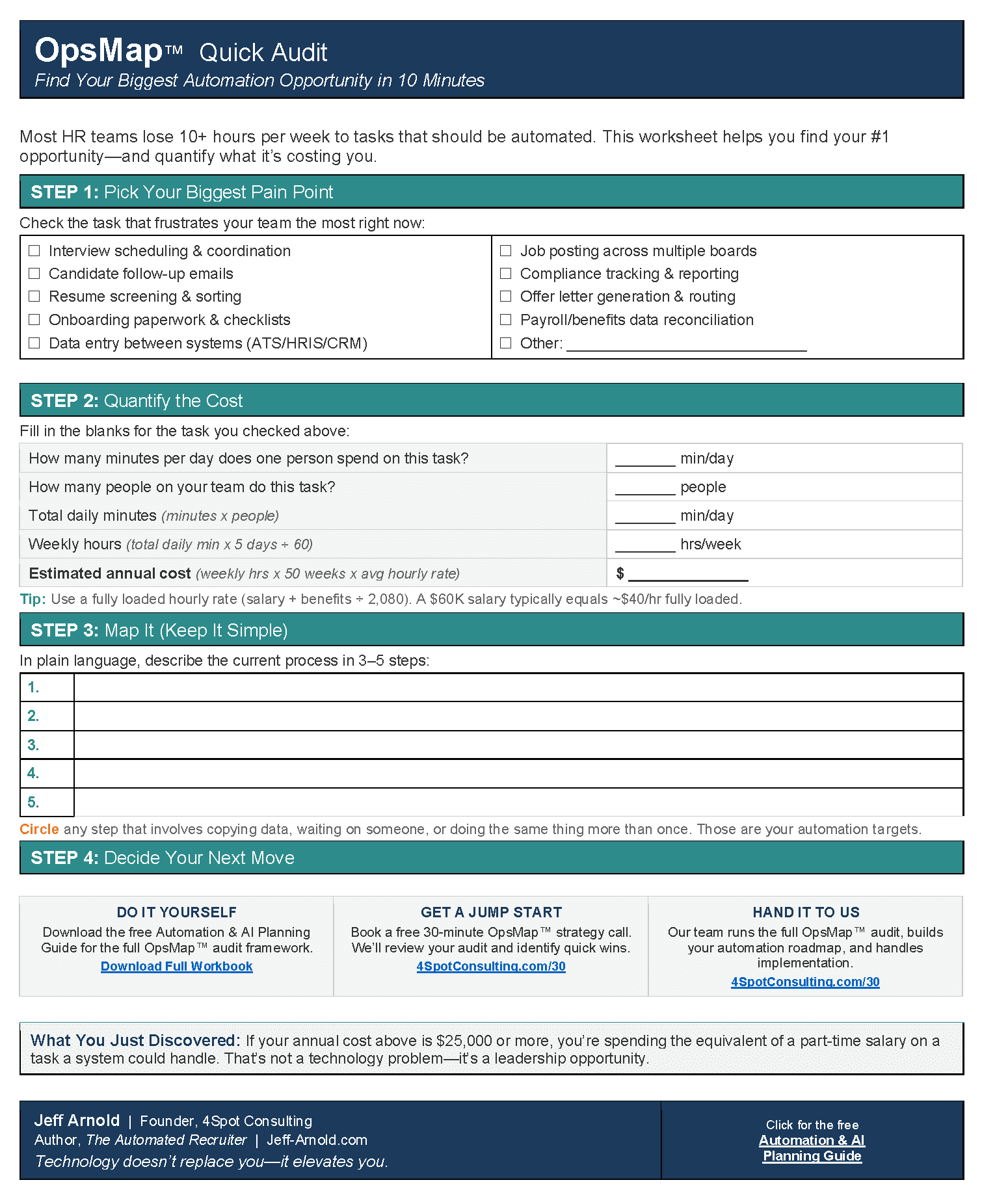
This is a process design failure, not a people failure. When SLAs aren’t written down, everyone defaults to “as soon as possible,” which means whenever convenient. OpsMap™ starts with the process documentation step that most teams skip: every step in the hiring workflow, with an owner, a response time expectation, and a defined escalation path when that expectation isn’t met.
3. Tool-First Buying, Workflow-Second
Leaders buy ATS and AI tools based on demos. Demos show the clean path—a perfectly structured requisition feeding into a perfectly formatted resume pool, generating a ranked shortlist in thirty seconds. The demo never shows what happens when the intake call didn’t happen, the job description is three years old, the hiring manager changes the criteria mid-process, or the background check vendor goes silent for two weeks.
“I’ve been experimenting with AI recruiting tools for a couple of months now, and the pattern that I keep running into is that the tools do the demo use case really well and then fall apart the moment something’s slightly outside that.”
Before buying any tool, map the workflow the tool is supposed to support. Every exception, every edge case, every place where a human currently makes a judgment call. Then evaluate the tool against that map—not the demo path.
4. Explosion in Candidate Volume and Noise
Oversaturated job markets, AI-generated resumes, and mass-application tools have increased inbound volume while decreasing signal quality. Screening load has gone up. The time spent on candidates who should have been filtered at submission is time stolen from candidates who deserve real attention.
This is solvable with structured intake criteria, better job description design, and automated pre-screening that filters on hard requirements before a recruiter touches the queue. But it requires the workflow to be designed first—automation can’t filter on criteria that haven’t been defined.
5. Vendor Opacity and Unreliable Partners
Background check vendors, job boards, and staffing partners are notorious for poor visibility. Timelines slip. Data quality is inconsistent. Status updates require a phone call instead of a webhook. Recruiters end up manually triaging vendor issues that should be surfaced automatically.
“It feels like agencies are just forced to burn thousands on a pilot to see if a board actually works because there’s no reliable way to get the unfiltered truth from other agency leaders beforehand.”
Vendor governance means defining what you need from each vendor in writing before you start: expected turnaround times, escalation contacts, data access requirements, and sunset criteria. A vendor who can’t commit to those terms in writing is telling you something important before you sign the contract.
6. Measuring Activity Instead of Throughput
Recruiters are evaluated on submittals, touches, and “hustle.” Those are activity metrics. They measure effort, not output. When the incentive is activity, the fastest path to good metrics is manual intervention—sending more emails, making more calls, updating more records by hand—not building a cleaner process that produces results with less friction.
The right metrics track where time is actually lost: time in each stage, response times from hiring managers, handoff delays, and manual touchpoints per hire. Those numbers tell you where your process is broken. Activity metrics tell you how busy your team is while the process stays broken.
How to Map Your Real Hiring Workflow
Most organizations have a hiring process that exists on paper and a hiring process that actually runs. The gap between them is where recruiter time disappears. Closing that gap starts with an honest map.
The OpsMap™ Method for Recruiting Workflow Design
Run this exercise before touching any tools or automation:
- Walk one real hire end to end. Pick a recent hire—not a perfect one, a typical one. Write down every step that happened, including every back-and-forth, exception, and workaround. Not the process as documented. The process as it ran.
- Identify every handoff. Where does work transfer from one person or system to another? Every handoff is a potential delay point and a place where context gets lost.
- Mark the manual choke points. Where is a human doing work that a system trigger or automation could handle? Status updates, calendar invites, reminder emails, data entry between systems—mark every one.
- Assign ownership and SLAs to every step. Every step needs an owner and a response time expectation. If you can’t name who owns a step, that step is owned by nobody, which means it’s chased by everyone.
- Define escalation paths. What happens when an SLA is missed? If the answer is “the recruiter follows up manually,” you don’t have an escalation path. You have a dependency on recruiter memory.
This is the document you use to configure your ATS, build your automation rules, and set expectations with hiring managers. Skipping it means every tool you buy will run on top of a broken process.
Where Automation Actually Helps
Automation removes repetitive, rule-based work from recruiter plates. It does not assess candidates, build relationships, or make judgment calls. The point is to give those judgment calls back to the recruiter by clearing everything else out of the way.
Make.com is the automation platform that handles this work reliably across the HR and recruiting tool stack. These are the highest-ROI automation points in a typical hiring workflow:
Calendar Integration and Interview Scheduling
Interview scheduling is one of the most time-intensive manual tasks in recruiting. Automated scheduling links tied to hiring manager calendars eliminate the back-and-forth. Confirmation emails and reminders to both candidate and interviewer remove the no-show follow-up entirely. This one automation typically reclaims 3–5 hours per week per recruiter.
Auto-Reminders to Hiring Managers and Candidates
Hiring manager feedback delays are the single most common cause of time-to-hire overrun. An automated reminder at 24 hours and 48 hours after an interview, with an escalation to the hiring manager’s direct report at 72 hours, closes most of these gaps without recruiter involvement.
ATS/CRM Hygiene Rules
Candidate records that don’t update automatically require recruiters to update them manually. Automations that push status changes from interview scheduling tools back to the ATS, pull background check status into candidate records, and sync offer letter status from DocuSign to the ATS eliminate an entire category of data entry. Nick, a recruiter at a small firm, reclaimed 15 hours per week when this integration was built—150+ hours per month across a team of three.
Auto-Status Updates from Background Check Vendors
If your background check vendor has an API, build the webhook integration. Status changes—initiated, in progress, clear, flagged—should push automatically to your ATS and trigger the appropriate next step without a recruiter checking a vendor portal. If the vendor doesn’t have a usable API, that’s vendor governance data: note it, and let it inform your next contract renewal decision.
Templates and Snippets for Common Communications
Recruiter time spent on templated communications—application received, moving forward, not moving forward, offer details—is time that could be saved entirely. A structured template library with automation triggers for each stage removes this from the queue. The recruiter reviews, personalizes when needed, and approves—not writes from scratch.
Expert Take
The teams I see failing at recruiting automation are the ones who try to automate everything at once. The ones who succeed pick one choke point—usually interview scheduling or hiring manager reminders—build the automation, confirm it works, and then move to the next one. Ninety days of incremental improvement beats one six-month implementation project every time. Automation first, then AI. Standardize the process before you try to apply intelligence to it.
Using AI Honestly: What It Does Well and Where It Falls Apart
AI tools for recruiting are real and useful in specific contexts. They are not a replacement for process design, and they fail reliably when applied to workflows that aren’t already structured. Here is an honest accounting of where AI helps and where it doesn’t.
Where AI Adds Real Value
- Drafting outreach messages: AI writes a solid first-draft cold message based on a candidate’s profile and a job description. The recruiter edits and personalizes. This is a legitimate time save.
- Summarizing interviews: AI notetakers that transcribe and summarize structured interviews reduce documentation time. The qualifier is “structured.”
- Generating structured notes from intake calls: If the intake call has a consistent format, AI can produce a structured brief. This requires a format to follow. Most intake calls don’t have one.
- Triaging inbound applications against defined criteria: AI can filter applications against hard requirements—certification required, location required, visa status required. It requires those criteria to be defined clearly. They usually aren’t.
Where AI Falls Apart
- Unstructured phone screens: AI notetakers built for Zoom meetings don’t handle a ten-minute phone screen over a mobile connection. Several widely used tools simply fail here and produce nothing usable.
- Context retention across a process: Sourcing tools that lose the brief from the intake call between sessions are building a new search from scratch each time. This defeats the purpose of the tool entirely.
- Anything outside the demo path: The pattern is consistent. Tools perform well on clean, structured inputs. They degrade rapidly when the input is messy—which is most of real recruiting most of the time.
The evaluation standard for any AI tool should be its worst-case performance, not its best-case demo. Ask vendors for the edge cases. Ask for what happens when the intake data is incomplete, when the candidate responds in a way the system doesn’t expect, when the process takes a nonstandard path. If the vendor can’t demonstrate those scenarios, you don’t have enough information to buy.
Stakeholder and Vendor Governance: The Framework Most Teams Skip
Recruiting outcomes depend on inputs that recruiters don’t control: hiring manager feedback, approved job descriptions, background check results, offer approval timelines. Without governance structures, every one of these dependencies becomes a manual chase.
Hiring Manager SLAs
Define in writing, before the role opens:
- Intake call required within 48 hours of req opening
- Resume review feedback within 24 hours of submission
- Interview feedback within 24 hours of interview completion
- Offer decision within 48 hours of final interview
These aren’t suggestions. They’re commitments. When they’re missed, an automated reminder fires. When they’re missed twice, the recruiter’s manager is looped in. Build this into your ATS workflow, not into recruiter calendar reminders.
Vendor Accountability Framework
For every external vendor in your recruiting stack, document:
- Expected turnaround time, defined specifically (not “5–7 business days”—5 business days, measured from submission)
- API or webhook availability and what data it surfaces
- Escalation contact with a name and response commitment
- Sunset criteria: at what failure rate or timeline miss do you put the contract on review?
Vendors who provide poor visibility or unreliable timelines do not become better vendors after you sign the contract. Set the requirements before you sign. Evaluate at 90 days. Exit cleanly when the criteria aren’t met.
Tool Sunset Discipline
“We are all collectively just vibes-hiring while pretending we have a process.”
Tool proliferation is usually a failure to sunset underperforming tools, not a failure to buy new ones. Every tool in your stack that doesn’t have a defined owner, a measured use case, and an active user base is creating maintenance overhead without contributing output. Review your stack quarterly. Kill what isn’t working.
Capacity and Role Design: Stop Solving a Process Problem by Hiring
The instinct when recruiting is overloaded is to add headcount. That instinct is almost always wrong. Adding a recruiter to a broken process doubles the broken process. Fix the process first.
The Talent Ops Split
The highest-leverage organizational change available to most HR leaders is separating process operations from sourcing and relationship work. A talent ops function—even a fraction of a person—owns the systems, reporting, data hygiene, and vendor relationships that currently consume recruiter time. This frees recruiters to do the one thing automation cannot: assess people and build candidate relationships.
For teams that can’t justify a dedicated talent ops hire, the first OpsSprint™ is to identify what percentage of each recruiter’s week is admin versus sourcing, and set a 90-day target to shift that balance by twenty points. Build the automations that achieve that shift before evaluating headcount.
Realistic Recruiter Ratios
Industry benchmarks for recruiter-to-open-requisition ratios are built around manual processes. When core scheduling, status updates, and data hygiene are automated, those ratios shift. A recruiter running an automated workflow can carry more requisitions at higher quality than one doing the same work manually. Build your headcount models against automated throughput, not manual throughput.
Sarah’s Results
Sarah is an HR Director at a regional healthcare organization. Before building a structured automation layer across her ATS, scheduling tools, and background check vendor, she was spending twelve hours a week on coordination and status work. After OpsBuild™ implementation—calendar integration, hiring manager reminders, automated status pushes from the background check vendor—that twelve hours dropped to one. Hiring time shortened by sixty percent. The twelve hours she recovered went directly to candidate engagement and hiring manager relationship work. The difference in quality of hire was measurable within ninety days.
The Metrics That Surface Workflow Failure Before It Becomes Burnout
You cannot fix what you are not measuring. The metrics that matter for recruiting workflow health are not the ones most teams track.
Replace These With Better Metrics
| Activity Metric (Stop Tracking) | Throughput Metric (Start Tracking) |
|---|---|
| Submittals per week | Time-in-stage (offer letter to start date, specifically) |
| Touches per candidate | Hiring manager response time (hours, not days) |
| Calls made | Handoff delay at each stage transition |
| Emails sent | Manual touchpoints per hire (how many things required human intervention) |
| Reqs open | Stage conversion rates (where are candidates stalling?) |
Monthly Process Iteration
Set a monthly thirty-minute review using these metrics. The questions to answer each month:
- Where is time-in-stage longest, and why?
- Which hiring managers are missing SLAs, and what is the pattern?
- How many manual touchpoints per hire did we log this month, and which ones are candidates for automation?
- Which vendor had the most timeline misses, and are we within our defined exit criteria?
This meeting should produce one process change. Not a strategy. One thing that gets fixed in the next thirty days. OpsCare™ is the ongoing discipline of making those incremental improvements rather than treating process improvement as a project with a start and end date.
Expert Take
The teams that sustain recruiting performance over time are the ones running monthly process reviews using throughput data. Not quarterly. Not annually. Monthly. Recruiting conditions change too fast for anything slower. When you build the habit of reviewing time-in-stage data monthly and making one concrete process change, the improvement compounds. Eighteen months in, you have a fundamentally different operation than when you started—without having run a single transformation project.
What This Looks Like When It Works
These are outcomes from actual implementations—not projections, not demos.
Nick: 15 Hours Reclaimed Per Recruiter Per Week
Nick runs recruiting for a small firm with three recruiters. The team was spending the majority of its time on ATS updates, status chasing, and manual scheduling coordination. After implementing Make.com automations for scheduling, ATS hygiene, and hiring manager reminders, each recruiter reclaimed fifteen hours per week. Across three recruiters, that’s more than 150 hours per month returned to sourcing and candidate relationship work.
Sarah: 60% Reduction in Hiring Time
A regional healthcare HR Director. Twelve hours per week in coordination work dropped to one after automating her ATS, scheduling, and background check workflow. Hiring time cut by sixty percent. The capacity freed by automation went directly into candidate engagement—the work that determines quality of hire.
TalentEdge: $312K Annual Savings, 207% ROI
A talent acquisition operation that committed to a full workflow redesign using OpsMap™ and OpsBuild™. Total annual savings of $312,000. Return on investment of 207%. The driver was not headcount reduction—it was recovering recruiter time from admin and redeploying it to higher-value work.
How to Get Started Without a Six-Month Transformation Project
The fastest path to results is a ninety-day sprint, not a transformation roadmap.
Days 1–30: Map and Measure
- Walk one real hire end to end. Document every step, every handoff, every manual touchpoint.
- Identify your top three manual choke points by time consumed.
- Set baseline metrics: current time-to-hire, average hiring manager response time, manual touchpoints per hire.
Days 31–60: Automate One Choke Point
- Pick the highest-time-cost manual touchpoint from your map.
- Build the automation using Make.com. Calendar integration and hiring manager reminders are the most common starting points.
- Run it for thirty days and measure the change.
Days 61–90: Extend and Systemize
- Add the second-highest-cost choke point automation.
- Document your SLA framework for hiring managers and begin enforcing it.
- Build the monthly metrics review habit.
After ninety days, you have measured results, a functioning automation layer, and a process review cadence. That is the foundation for everything that follows.
Frequently Asked Questions
How do I get hiring managers to actually follow SLAs?
Write the SLAs down before the requisition opens, get explicit commitment from the hiring manager and their manager, and automate the reminders. The moment a missed SLA requires a recruiter to manually follow up, it becomes optional. When the system sends the reminder automatically—and escalates to a manager—the accountability is built into the process rather than dependent on the recruiter’s willingness to have an uncomfortable conversation.
Which automation should I build first?
Interview scheduling and hiring manager reminders. These two automations reclaim more recruiter time per hour of build investment than any other starting point. Calendar integration typically takes one to two days to build in Make.com. The time savings are visible within the first week.
Should I replace my ATS or fix the process first?
Fix the process first. Most ATS failures are process failures that get blamed on the tool. A new ATS running on top of a broken process produces the same outcomes as the old ATS running on top of a broken process—faster. Map your workflow, define your requirements, and evaluate any ATS against your documented process before buying.
Are AI recruiting tools worth the cost?
Depends entirely on which use case you’re solving and whether your process is structured enough for the tool to function. Evaluate AI tools against your worst-case scenarios, not the demo path. If the vendor won’t show you edge cases, that’s your answer.
How many tools does a recruiting team actually need?
Fewer than most teams are currently running. The goal is minimum viable tooling connected by solid automation—not maximum tool coverage. Every disconnected tool adds integration debt and manual coordination work. Audit your stack quarterly and sunset tools that don’t have active users and measurable output.
What does a talent ops function actually do?
Talent ops owns the systems, data, reporting, and vendor relationships that currently consume recruiter time. In a small team this might be twenty percent of one person’s role. In a larger organization it’s a dedicated function. The goal is to get this work off recruiter plates entirely—not because it’s unimportant, but because it requires different skills and consumes capacity that should go to candidate evaluation and relationships.
How do I measure whether my automation is actually working?
Track manual touchpoints per hire before and after. Track time-in-stage for the specific stage the automation targets. Track recruiter self-reported time on administrative work monthly. If those numbers don’t move in ninety days, the automation either isn’t running correctly or isn’t addressing the real choke point.
What’s the fastest way to get recruiting leadership to fund workflow improvement?
Calculate the cost of your current time-to-hire in revenue terms. Every day a role stays open has a productivity cost tied to the work not being done. If your average time-to-hire is forty-five days and the role is a revenue-generating position, the math usually makes the case. Pair that with a concrete projection from one automation—fifteen hours reclaimed per recruiter per week multiplied by fully-loaded cost—and you have a business case that finance can evaluate.
Sources and Further Reading
- SHRM Talent Acquisition Benchmarking Report – time-to-fill and cost-per-hire benchmarks by industry
- LinkedIn Global Talent Trends – recruiter workload and process complexity data
- Aptitude Research: The State of Talent Acquisition Technology – tool adoption and integration failure patterns
- ERE Media: Recruiter Burnout Survey data – self-reported time on administrative vs. sourcing work
- Make.com Integration Documentation – ATS, HRIS, and scheduling tool connector library
Summary: The Fix Is Structural, Not Motivational
Recruiting burnout is not a resilience problem. It is a design problem. The workload has been restructured over the past decade to pile administrative coordination on top of the sourcing work, and most teams never redesigned their process to account for that shift.
The fix requires three things in order: an honest process map, an automation layer that removes manual coordination from recruiter plates, and a measurement cadence that surfaces where the process is failing before the team burns out. That’s not a transformation. It’s a ninety-day sprint followed by a monthly maintenance habit.
If you’re a recruiter who just spent another week feeling like the sourcing wasn’t the exhausting part—you’re not wrong. The exhausting part is the work that was never supposed to be yours. Building the system to take it back is the job now.


RELATED POST